
The Dallas County Court Calendar
Dallas County offers more than one view of its court calendar. The hub gathers links for many courts. It covers county criminal, criminal district, civil district, County Court at Law, probate, family district, and Justice of the Peace courts. A single daily docket answers one narrow question. It lists what that court has set for the day shown. It is not a full case history. It cannot stand in for a filed notice.
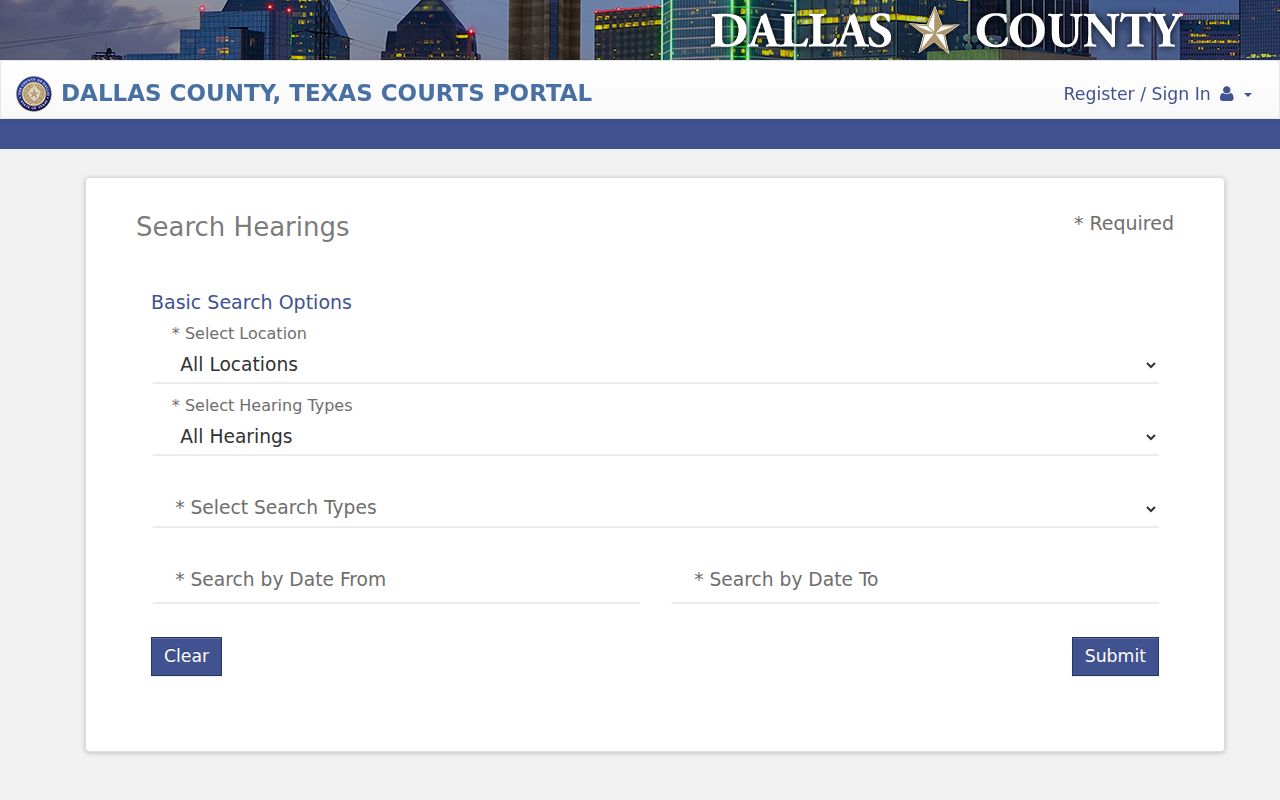
The Dallas County Courts Portal Hearing Search works from a different angle. You can query by location, hearing type, and search type. Judicial officer, courtroom, and a date range round it out. Use it to narrow a setting. Then compare what you find against the assigned court's daily docket. Remember that each court's own rules still govern the call time, appearance mode, and any filing needed to place or remove a matter from the calendar.
Dallas County Hearing Search Filters
The Hearing Search is the strongest tool here. Use it for a date-based check of the Dallas County court calendar. Several of its fields are required. So it does not work as a loose one-box lookup. The live menus of court locations, hearing types, judicial officers, and rooms shift over time. Rely on the portal's current lists rather than guessing a label.
| Search control | Use on the calendar | Required |
|---|---|---|
| Location and hearing type | Routes the query to the place and kind of setting | Yes |
| Search type and criterion | Sets how the name or other criterion is read | Yes |
| Last and first name | Narrows the person attached to the hearing | Yes |
| Middle name | Helps separate similar names | No |
| Judicial officer and courtroom | Confirms the assigned court and room | Yes |
| Date from and date to | Creates a bounded calendar window | Yes |
The official Hearing Search screen shows how these controls are arranged.
Because of those required fields, a short date span plus known court details beats a broad countywide name query. Give the search what it asks for and it will serve you well.
How to Find Your Court Date
Begin with any written notice or order served on you. It may pinpoint the court better than a name search can. Dallas County splits its work between two clerks. Court-specific pages, ten JP places, and city courts keep separate calendars. That structure matters. It makes the court name as vital as the party name.
- Open the county Hearing Search for a bounded date inquiry, or use Daily Docket Search when the assigned court and day are known.
- Search by the case number or required name fields. Add the court location, hearing type, judicial officer, courtroom, and short date range when called for.
- Compare the result with the individual court's daily docket and any filed Notice of Hearing, reset, or continuance. The broader Dallas County case search can help identify the case and court.
- Call the responsible clerk or court coordinator when sources disagree. The District Clerk handles district civil, family, and felony matters; the County Clerk handles county civil, misdemeanor, and probate matters.
- Use the clerk's counter or a courthouse public terminal when online access fails. Check a posted daily docket at the court if one is available.
- Confirm with counsel if represented. re:SearchTX is a role-based statewide layer, but it excludes criminal case records and is not a full public substitute for Dallas County sources.
Municipal citations and JP matters belong with the issuing city or the correct precinct and place. Do not force them into a District Clerk search. When you call, ask for the date, time, location, court, and appearance method; clerk staff cannot give legal advice.
Dallas County Daily Docket Columns
The general and criminal daily docket pages include a compact name search. Common result columns are Party Name, Date, Time, Room, and Floor. Civil district samples may swap the room field for Floor/Court. They can display the case number too. Sometimes the page returns no rows at all. That empty screen could reflect the chosen day. A reset, a different court page, or an index delay may be the cause. It may not mean the case is missing. The official general Daily Docket Search lays out this small field set clearly on the county's site.
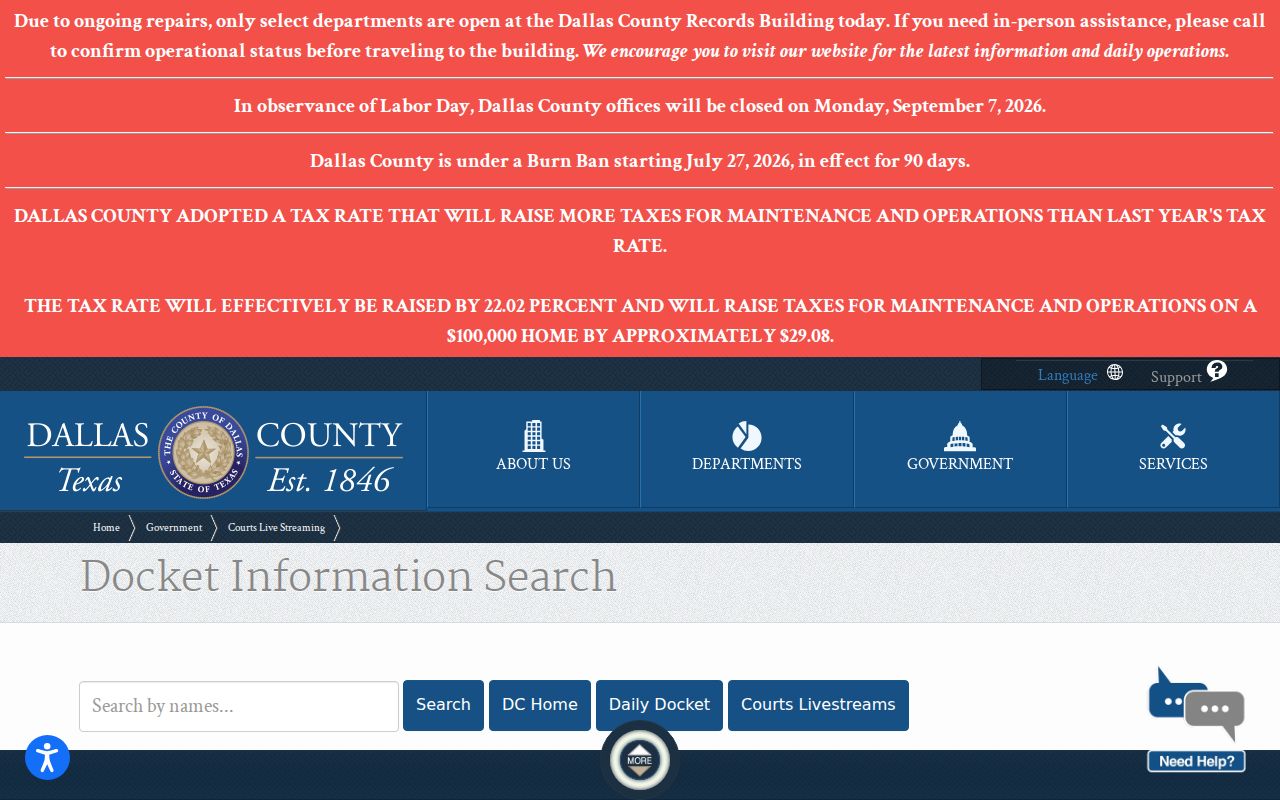
Every column here is scheduling data and nothing more. A Dallas County daily docket entry tells you when and where a hearing happens. It does not tell you who won, who pled, or how the case got here.
So capture the details that matter. Write down the court name. Add the case number when one appears, the date, the time, and the room or floor. Note the day you checked the page, too. Skip saving a public copy that shows private names. A plain written note of the source is safer. If the docket changes later, that note makes the change easy to explain.
Reading a Court Setting
A Dallas County court setting is one scheduled event, not a judgment. Read every field together. The listed time may start a docket call. One case may not be heard at that exact minute. A room or floor may point to a physical courtroom. A court-specific notice could still allow a remote appearance instead.
| Date | The day currently displayed for the setting; compare it with the latest filed notice. |
|---|---|
| Time | The listed call or hearing time, which may apply to several cases. |
| Courtroom | The room, floor, or court assignment shown by the source. |
| Judge | The judicial officer filter or assigned court, not proof that the listed judge will hear every matter. |
| Setting Type | The calendar purpose, such as arraignment, status conference, motion hearing, docket call, or trial. |
An old browser tab carries less weight than a filed order or direct confirmation from the court. Check again close to the hearing, above all if counsel has discussed a reset or settlement.
Dallas County Setting Terms
Calendar labels describe the planned event, not the final outcome. Dallas County publishes no single code glossary covering every court. Read only a term shown in the specific record into that setting.
- Docket call or sounding
- A calendar call used to learn whether a case is ready and what should happen next.
- Announcement docket
- A setting where counsel reports readiness, settlement, plea, or another requested action.
- Status conference
- A court check on the case's posture or compliance with prior directions.
- Motion hearing
- A setting for one or more requests filed for the court to decide.
- Continuance or reset
- A move from one date to another; the reason and effect depend on the order and court.
Do not treat "disposed" as a setting type, and do not assume "trial" means a final judgment was entered that day. The case docket and signed orders answer those questions later.
Resets, Continuances, and Cancellations
Three words show up when a Dallas County court date moves. A reset puts the matter on a new date. A continuance pushes a proceeding back by court action. A cancellation can follow a settlement. It can also follow a nonsuit, an agreed order, or some other filed notice. Each one leaves its own paper trail. A talk between the parties, by itself, changes nothing on the Dallas County court calendar.
The 162nd District Court procedures show how local rules bite. Nothing is formally set until a Notice of Hearing is e-filed there. Oral announcements and emails will not remove it. The court calls for a settlement as applicable. It also asks for an agreed order, nonsuit notice, or Notice of Settlement. Its two-week trial docket begins on a Tuesday. Cases must be ready on 24-hour notice. A trial continuance alone does not move each scheduling-order deadline.
Whenever a date shifts, look at both the event history and the new calendar entry. If an older setting still sits beside a newer one, call the coordinator.
Dallas County Remote Court Settings
Dallas County has no single remote-hearing link. County Court at Law No. 4 posts its own Zoom procedure and email route. Probate Court No. 3 has used a virtual docket document. It also offers a Notice of Virtual Court Appearance form. Family court materials can separate daily Zoom access from older private codes. Never carry a link from one court, date, or hearing type into another setting.
Check the court, the date, and the hearing type. Check the current access instructions before you rely on any link. Some proceedings stay in person. A public livestream is one thing. A link that lets a party appear is another. The public daily docket is a third. Watching a stream does not put anyone in the hearing.
Remember: a remote link counts as a method of appearance only when the assigned court authorizes it. That authorization must cover that Dallas County setting.
Dallas County Calendar Authority
Court Administration can point you to court directories and docket pages. A clerk can confirm what the record displays. A court coordinator may explain scheduling practice, the assigned courtroom, and the current call. But only the court itself can grant a continuance. Only the court can sign an order, or decide a setting has been removed. That line matters when a portal and an informal message disagree.
So use the Daily Docket as a current calendar clue. Use the Courts Portal as a case and hearing index. Treat the filed notice or order as the formal record. For a municipal or JP court matter, use that court's own channel. This source chain keeps a Dallas County court calendar check tied to the court with control of the case.
What To Do If You Miss a Setting
Act promptly. Write down the case number, the court, the date, and any notice received. If an attorney represents you, make contact first. Otherwise call the responsible clerk or court coordinator through the official court page. Ask what the record shows. Ask what procedure applies. An online payment, a fresh docket search, or an email to the wrong office will not fix a missed Dallas County court date.
Missed a Setting? A missed court date may lead to a failure-to-appear action, warrant, bond issue, default, or another court response based on the case.
Contact the assigned Dallas County court, clerk, and your attorney at once to confirm status and the next lawful step.
Only the court can set a new date or withdraw an order; do not rely on an old calendar row as proof.
A civil case and a criminal case can carry very different consequences. Avoid guessing from a calendar label. If the case will not come up in a docket search, use the clerk counter or public terminal and ask whether it is restricted, archived, or assigned elsewhere.